uploaded 1 day ago
Captive-portal WiFi setup, buffered web logger with crash reports, OTA update page with rollback and an optional LVGL boot screen for ESP32 projects
Readme
# Preflight-IDF
[](https://github.com/diydoohickeys/Preflight-IDF/actions/workflows/build.yml)
**Preflight** is everything an ESP32 project needs before the interesting part starts: a
captive portal for WiFi credentials, a buffered logger with a web view and crash reports, an
OTA update page with rollback, and an optional LVGL boot screen. Pure ESP-IDF — no Arduino
layer.
> This is the ESP-IDF component. The sister library **Preflight-Arduino** exposes the same API
> on the Arduino framework.
## Features
- **Captive portal** — DNS server redirects any lookup to the setup page, so joining the
device's AP pops the form automatically.
- **Network scanning** with signal strength, scanned lazily so a successful boot never
pays for a scan nobody looks at.
- **Persistent credentials** in NVS, with the device name normalised for mDNS.
- **mDNS** — the device is reachable at `<device-name>.local`.
- **Reconnect supervision** — a dropped AP is retried with backoff rather than leaving
the device unreachable until a power cycle.
- **Logger** with a PSRAM-backed ring buffer, a `/logs` web page (live-tail over a
consumer-provided WebSocket), `/api/logs` JSON, and previous-boot crash decoding.
- **Device password** — chosen in the setup portal; every page and endpoint sits behind a
sign-in (session cookie) or an API key, and the application gates its own routes the same way.
- **HTTPS** (optional, the user's switch on `/setup`) — a certificate made on the device, port 80 redirecting; `tools/preflight-certs.ps1` signs it with your own CA so browsers trust it.
- **OTA** — a `/update` page for firmware and (opt-in) filesystem images, behind the device
password, with progress callbacks for LEDs/screens and automatic rollback.
- **Optional LVGL boot screen** showing setup progress, compiled out when LVGL is absent.
- **Embedded web assets** — no SPIFFS/LittleFS partition needed to serve the UI.
## The pages
| Setup | Logs | Update |
|---|---|---|
| 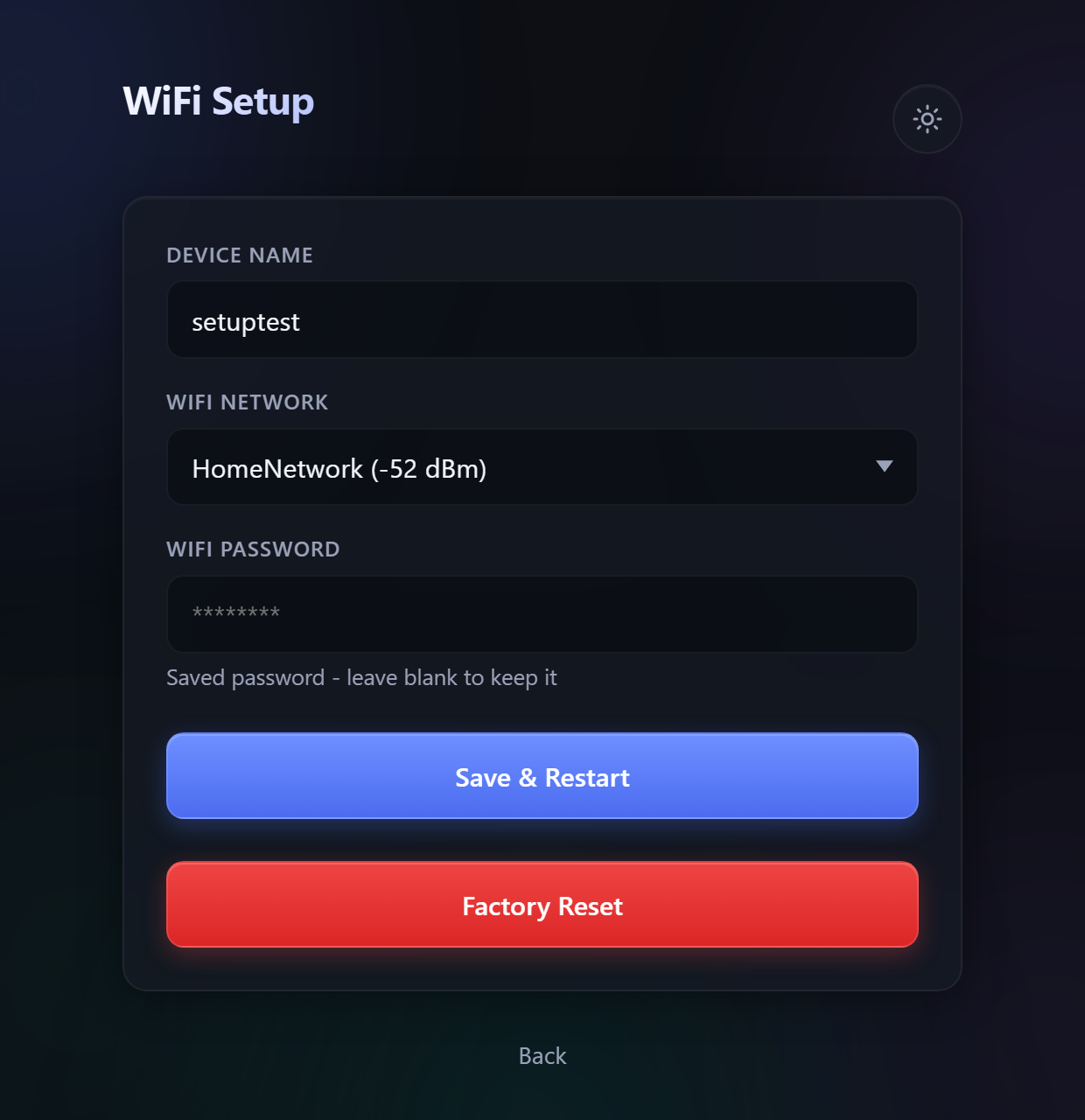 | 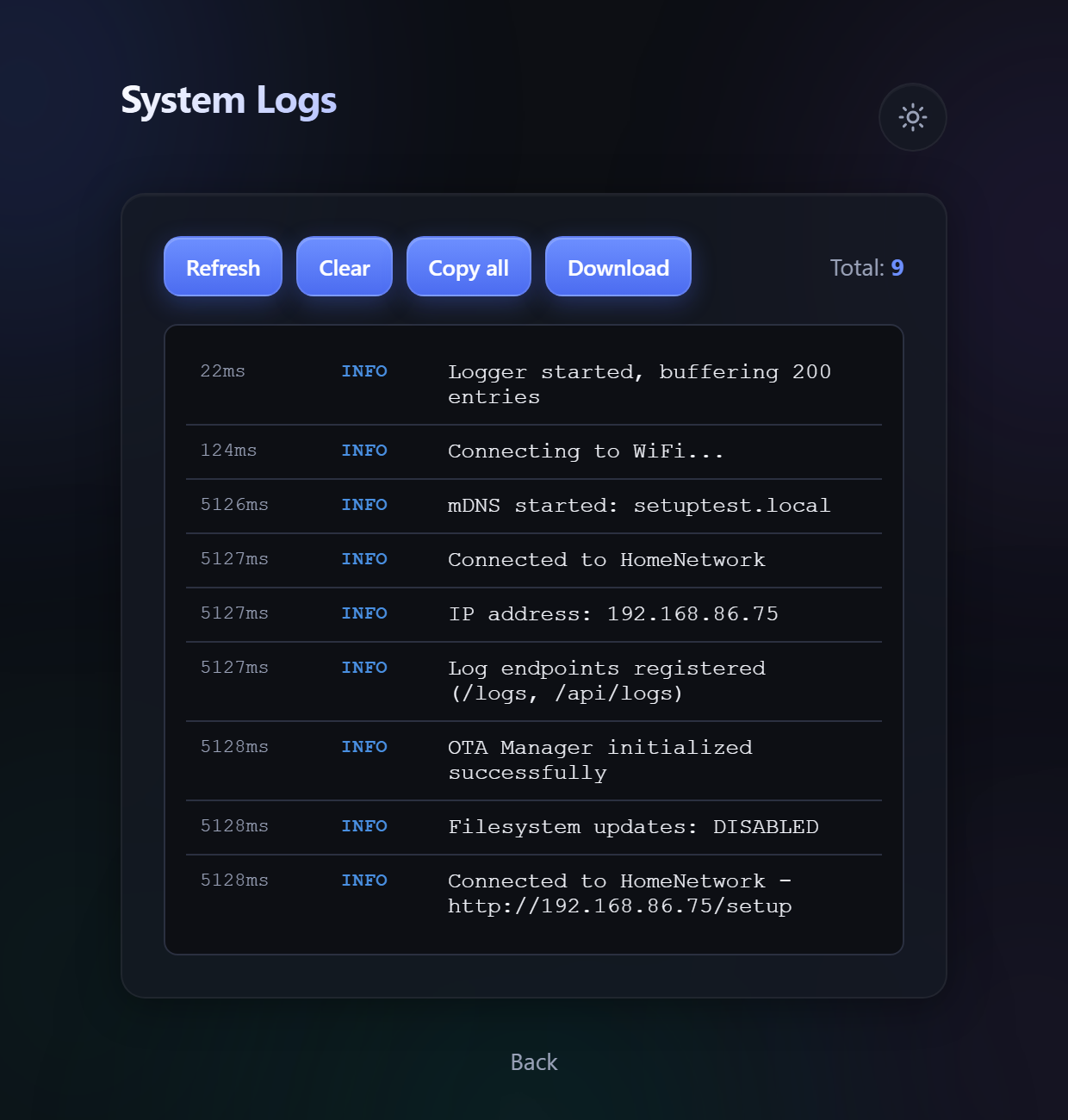 | 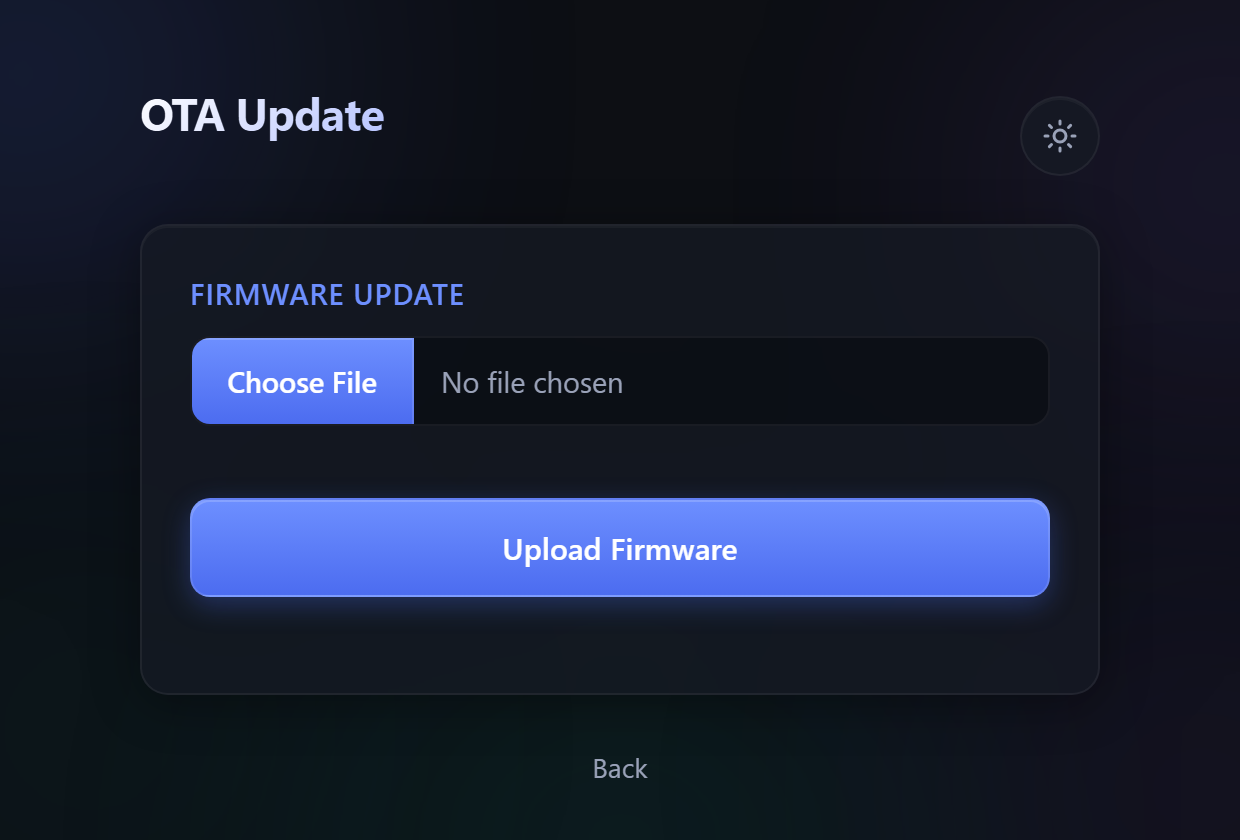 |
## Requirements
Read this section before adding the component; the first three are required.
| Requirement | Why |
|---|---|
| **`CONFIG_COMPILER_CXX_EXCEPTIONS=y`** | The Logger's PSRAM allocator throws `std::bad_alloc` and the logger catches it, so the component does not compile under IDF's default `-fno-exceptions`. The build fails at configure time with a message naming this if it is off. |
| **`CONFIG_COMPILER_CXX_EXCEPTIONS_EMG_POOL_SIZE` non-zero** | At 0 a `throw` under memory pressure calls `std::terminate()` directly and no `catch` runs — so the logger's degrade-gracefully path becomes dead code that merely looks correct. 1 KB is ample. |
| **`CONFIG_LWIP_MAX_SOCKETS=16`** | The web server allows 12 open sockets and httpd reserves 3 more. At IDF's default of 10, `httpd_start` fails and no page is served. |
| ESP-IDF 5.3 or later | Developed against 6.0; CI builds on 5.5 and 6.0. |
Optional:
| | |
|---|---|
| **LVGL 9** | Only for `WiFiSetupBootUI`; add it to your own project. See *Headless builds* below. |
| **PSRAM** | The logger prefers PSRAM for its buffer and falls back to internal heap. |
`nvs_flash_init()` is called by `begin()` (idempotently, handling the
erase-and-retry case), so a consumer that already initialised NVS is fine and one that
has not does not have to.
## Installation
From the [ESP Component Registry](https://components.espressif.com/components/diydoohickeys/preflight):
```
idf.py add-dependency "diydoohickeys/preflight^1.1.0"
```
or add it to your project's `main/idf_component.yml` by hand:
```yaml
dependencies:
diydoohickeys/preflight: "^1.1.0"
```
To track the repository instead:
```yaml
dependencies:
preflight:
git: https://github.com/diydoohickeys/Preflight-IDF.git
version: main
```
Then in `sdkconfig.defaults`:
```
CONFIG_COMPILER_CXX_EXCEPTIONS=y
CONFIG_COMPILER_CXX_EXCEPTIONS_EMG_POOL_SIZE=1024
CONFIG_LWIP_MAX_SOCKETS=16
```
The repo root **is** the component, so no `path:` is needed.
## Example
[`examples/basic`](examples/basic) is a complete headless project: WiFi setup, `/logs` and
`/update`, a 4 MB dual-OTA partition table and crash reporting.
```
idf.py create-project-from-example "diydoohickeys/preflight:basic"
cd basic
idf.py set-target esp32s3
idf.py build flash
```
From a clone, `cd examples/basic` instead of the first two lines; it builds against the checkout.
Clone into a folder named `preflight` (`git clone https://github.com/diydoohickeys/Preflight-IDF.git preflight`):
IDF names a local component after its folder.
### Headless builds (no display)
Nothing to configure: LVGL is linked only when your project already has it, and the boot UI
compiles out without it (details in [`LVGL.md`](LVGL.md)).
## Quick start
```cpp
#include "WiFiSetupManager.h"
static WiFiSetupConfig makeConfig() {
WiFiSetupConfig config;
config.defaultAPName = "MyDevice-Setup";
config.defaultAPPassword = "mypassword123"; // min 8 chars, or the AP is open
return config;
}
static WiFiSetupManager wifiSetup(makeConfig());
extern "C" void app_main(void) {
wifiSetup.begin(); // connects, or brings up the portal
while (true) {
wifiSetup.update(); // deferred restarts + reconnect supervision
vTaskDelay(pdMS_TO_TICKS(10));
}
}
```
`update()` must be called regularly: it owns the deferred restart after a settings save
and the reconnect backoff. Without it a saved configuration never reboots into effect.
### First run
With no stored credentials the device starts an AP named by `defaultAPName`. Join it, and
the captive portal opens the setup page (or browse to `192.168.4.1/setup`). Enter a device
name, pick a network and choose the **device password**; the device saves, restarts, and comes
up on your WiFi at `<device-name>.local`, where every page asks you to sign in.
`defaultAPPassword` is only the setup hotspot's WiFi key. It is not a login: the device
password is chosen on that first visit, so there is no default one to change.
## Configuration
```cpp
struct WiFiSetupConfig {
std::string defaultAPName = "ESP32-Setup";
std::string defaultAPPassword = "setup123"; // >= 8 chars, else the AP is open
std::string preferencesNamespace = "wifi"; // NVS namespace
std::string deviceNameKey = "host_name";
std::string ssidKey = "ssid";
std::string passwordKey = "password";
uint16_t webServerPort = 80;
uint16_t dnsPort = 53;
uint8_t maxConnectionAttempts = 10;
uint16_t connectionTimeout = 500; // ms between attempts
WiFiStatusCallback* statusCallback = nullptr;
WiFiSetupTheme* theme = nullptr;
};
```
## Status callbacks
```cpp
class MyCallback : public WiFiStatusCallback {
void onScanStart() override { /* ... */ }
void onScanComplete(int networks) override { /* ... */ }
void onConnecting(const std::string& ssid) override { /* ... */ }
void onConnectionProgress() override { /* ... */ }
void onConnected(esp_ip4_addr_t ip) override { /* ... */ }
void onAPMode(const std::string& ap, esp_ip4_addr_t ip) override { /* ... */ }
};
```
⚠ **These fire from whichever task reached the event.** `onConnected()` runs on the system
event-loop task; the scan callbacks can run on the HTTP server task. An implementation that
touches a single-owner resource — LVGL in particular, which is not thread-safe — must
marshal the work onto that owner rather than doing it inline, and must never block: a delay
inside `onConnected()` stalls every other WiFi/IP event behind it.
## Theming
`WiFiSetupTheme` covers both the LVGL boot screen and the web UI. The web fields are
emitted as CSS custom properties appended after the built-in stylesheet, so they override
it; `cssVariables` and `customCSS` are appended last.
```cpp
WiFiSetupTheme theme;
theme.primaryColor = 0xFF6B35; // LVGL boot screen (0xRRGGBB)
theme.webPrimaryColor = "#FF6B35"; // web UI
theme.webBackgroundColor = "#1a1a1a";
theme.cssVariables["radius"] = "12px";
theme.customCSS = "h1 { letter-spacing: 2px; }";
WiFiSetupConfig config;
config.theme = &theme;
```
## Logger
```cpp
#include "Logger.h"
Logger.begin(300); // ring-buffer size; 0 disables buffering
Logger.setMinLevel(LOG_INFO);
Logger.reportLastCrash(); // decode the previous boot's core dump, if any
Logger.registerEndpoints(wifiSetup.getWebServer());
Logger.info("Started, heap=%u", (unsigned)esp_get_free_heap_size());
```
| Endpoint | |
|---|---|
| `GET /logs` | HTML view. `?max=N` widens the window, `?max=0` returns everything. |
| `GET /api/logs` | A JSON array of entries. Anything the buffer could not keep (out of memory, or logged before `begin()`) is reported as a synthetic WARNING entry at the head of the range, so a gap in the history is visible rather than silent. |
| `POST /api/logs/clear` | Empty the buffer. |
Both views default to the **last 300** entries, because rendering a full buffer builds one
large response that a RAM-tight server cannot serve. Retention is unaffected — only the
response is bounded — so the start of a boot (where `reportLastCrash()` prints) needs
`?max=`.
The `/logs` page can live-tail over a WebSocket at `/ws`. This library does **not** register
`/ws`; a consumer provides it. Pass `enableWebSocket=false` to `begin()` in a build that has
no `/ws`, so the page does not report a failed connect.
`reportLastCrash()` needs `CONFIG_ESP_COREDUMP_ENABLE_TO_FLASH`, a `coredump` partition and
the ELF format. It is a no-op otherwise, so it is safe to call unconditionally.
## OTA updates
```cpp
#include "OTAManager.h"
OTAManager ota;
ota.begin(wifiSetup.getWebServer(), ""); // "" = firmware only (see below)
ota.setScreenProgressCallback([](uint8_t pct, OTAManager::Stage stage) { /* ... */ });
// in the main loop
ota.loop(); // performs the reboot after a successful update
```
Browse to `http://<device>/update`. **Both** `/update` and the upload endpoint require the
device password (a signed-in browser or the API key), and the check runs before a single
upload byte is read. One upload runs at a time; a second one gets 409.
🚨 **Filesystem updates are a raw overwrite of the named partition.** The second argument to
`begin()` is the partition label and defaults to `"spiffs"`. **Pass `""` whenever that
partition holds user data rather than an uploadable image** — the upload then refuses
`type=filesystem` with a 400, and the page hides the Filesystem card entirely. One
accidental click there destroys the partition with no confirmation and no undo.
### Rollback and recovery
An upload is written to the inactive app slot and only booted once `esp_ota_end` validates
it, so an interrupted or corrupt upload leaves the running firmware in place. A valid image
that is broken — it crashes, or never gets back on the network — is caught by rollback when
`CONFIG_BOOTLOADER_APP_ROLLBACK_ENABLE=y`: the new image boots on probation,
`WiFiSetupManager` keeps it once the device is reachable — joined to WiFi, or serving the
setup portal, from which it can still be repaired — and if that hasn't happened within
`WiFiSetupConfig::rollbackTimeoutMs` (5 minutes) or the image resets first, the bootloader
returns to the previous one. Without that option the check is a no-op.
Pair it with the task watchdog (`CONFIG_ESP_TASK_WDT_PANIC=y`) so a hang becomes a reset. If
a device still ends up on a bad image, flash it over USB from download mode (hold BOOT while
connecting) — that path is in ROM and always available.
## Factory reset
`GET /factory-reset` serves a confirmation page; the reset itself is a POST carrying a
fixed confirmation token, so following a plain link cannot wipe the device. Both need the
device password. `WiFiSetupManager::factoryReset()` does the same from code (it clears the
WiFi settings and the device password, and schedules the restart for the next `update()`).
It is the only way back from a forgotten password, so a device with a button or a touch
screen should offer it there; otherwise erase the flash over USB.
## Device password
`AccessGuard` (the global `Access`) guards every Preflight page and endpoint. It is chosen
in the setup portal on the first save, and changed later on `/setup`, which also shows the
API key and a *Sign out everywhere* button.
- **Browsers** sign in at `/login` and get one session cookie (`HttpOnly`, `SameSite=Lax`,
a year), which survives reboots and OTA. All browsers share the token, so signing out — or
changing the password — signs every browser out.
- **Scripts** send `Authorization: Bearer <api key>`; regenerating the key on `/setup`
revokes the old one.
- **Until a password exists** (a device that has not been through setup), the setup routes
are open — reachable only by joining the setup hotspot — and everything else is refused.
- The password is stored as PBKDF2-HMAC-SHA256 (10 000 iterations, random salt). A sign-in
costs a few hundred milliseconds of the server task; after five wrong passwords in a row,
one attempt is allowed per 30 s.
Gate your own handlers with `allow()`, which sends the refusal itself — a page navigation is
redirected to `/login?next=…`, anything else gets a 401 JSON body:
```cpp
static esp_err_t myStatusHandler(httpd_req_t* req) {
if (!Access.allow(req)) return ESP_OK; // ESP_FAIL if the request body is unread
// ...
}
```
`isAuthorized(req)` checks without responding, for a WebSocket handshake. A browser never
sends a `SameSite=Lax` cookie on another site's WebSocket handshake, so checking the session
there also stops a page elsewhere from driving the device.
## Sharing the web server
`getWebServer()` returns the `httpd_handle_t` so an application can register its own
routes on the same server:
```cpp
httpd_uri_t status = { .uri = "/api/status", .method = HTTP_GET,
.handler = myStatusHandler, .user_ctx = nullptr };
httpd_register_uri_handler(wifiSetup.getWebServer(), &status);
```
Gate each one with `Access.allow(req)` (see *Device password*).
The server is configured with generous limits (176 URI handlers, 12 open sockets) because
the consumer's whole route table shares it. Overflow is silent — the last handlers
registered simply fail — so raise `max_uri_handlers` if a large application runs out.
## HTTPS
The server is plain HTTP by default, as ESPHome, Tasmota and WLED are: on a home network the
device password is the protection. `config.offerHttps = true` adds an HTTPS switch to `/setup`'s
Access card, off until the user turns it on (the device restarts; the choice is kept in NVS). On,
every page and route is served over TLS on `httpsPort` (443) once the device is on WiFi,
`webServerPort` (80) redirects to it, and the session cookie becomes `Secure`. The setup portal
stays plain HTTP, because a captive-portal browser can't accept a certificate. The certificate is
self-signed ECDSA P-256 for `<host>` and `<host>.local`, made on the device the first time (a few
hundred ms) and kept in NVS; it's made afresh when the hostname changes. If it can't be made, the server falls back to HTTP and
says so in the log. `isHttps()` reports which.
Each TLS connection holds about 30 KB of mbedTLS buffers. `maxOpenSockets` (12) caps the open connections; on a board without PSRAM, or without `CONFIG_MBEDTLS_EXTERNAL_MEM_ALLOC`, lower it (5 = two TLS connections plus the redirect).
Needs, in `sdkconfig.defaults`:
```
CONFIG_ESP_HTTPS_SERVER_ENABLE=y
CONFIG_MBEDTLS_X509_CREATE_C=y # certificate writing
CONFIG_MBEDTLS_EXTERNAL_MEM_ALLOC=y # TLS buffers in PSRAM...
CONFIG_MBEDTLS_DYNAMIC_BUFFER=y # ...and freed between records
```
In HTTPS mode the main server gets three fewer sockets, which the redirect server uses, so the
pair draws the same total from `CONFIG_LWIP_MAX_SOCKETS`. The certificate's private key sits in
NVS — pair HTTPS with NVS encryption (`CONFIG_NVS_ENCRYPTION=y`,
`CONFIG_NVS_SEC_KEY_PROTECT_USING_HMAC=y`, a free eFuse key block in
`CONFIG_NVS_SEC_HMAC_EFUSE_KEY_ID`; the first boot burns a random key there, which can't be undone).
A WebSocket on the shared server is gated in its URI's `ws_pre_handshake_cb` with
`Access.isAuthorized()`, which needs `CONFIG_HTTPD_WS_PRE_HANDSHAKE_CB_SUPPORT=y`. The `/logs`
page connects with `wss://` under HTTPS.
### A certificate your browsers trust
A self-signed certificate makes every browser warn, and a browser won't cache anything from a
site whose certificate it doesn't trust, so every page load is a full fetch and every new
connection a refused-then-retried handshake. `tools/preflight-certs.ps1` (PowerShell 7, on
Windows, macOS or Linux) fixes that with a certificate authority that lives only on your
computer:
```powershell
./tools/preflight-certs.ps1 -Device mydevice # first run also makes and trusts the CA
./tools/preflight-certs.ps1 -Broker homeassistant.local, 192.168.1.10 # an MQTT broker's certificate
./tools/preflight-certs.ps1 -Trust -CaFile ca.crt # trust the CA on another computer
```
Turn HTTPS on at `/setup` first. The script fetches a signing request for the device's own key (the key never leaves the
device), signs it for `<host>`, `<host>.local` and the device's address, uploads it with the CA,
and waits for the device to restart serving it. It needs the API key from `/setup`
(`-ApiKey`, `$env:PREFLIGHT_API_KEY`, or a prompt). The CA lives in `~/.preflight-ca`: share
`ca.crt` with other computers and phones, keep `ca.key` private and backed up. Device
certificates last 825 days; re-run `-Device` to renew, or after a hostname change.
The device keeps the CA too, as the trust anchor for its own outbound TLS:
`wifisetup::loadTrustedCa()` returns it, for example as an MQTT client's
`broker.verification.certificate`. `/setup` shows which certificate is served and can go back
to self-signed.
## Endpoints provided
| Route | |
|---|---|
| `GET /setup` | Configuration page |
| `GET /get-networks` | Scanned networks. A stale cache (over 15 s) scans inline, holding the request for 1–3 s; in setup mode the boot scan is served as-is (the AP-only radio cannot scan). |
| `GET /get-current-settings` | Stored device name and SSID, whether a WiFi password is stored (never the password) and whether a device password exists, as JSON |
| `POST /save-wifi` | Validate, save and restart (400 with a reason on bad input). A blank password for the already-saved network keeps the stored one. The first save also takes `device_password`. |
| `GET /factory-reset` | Confirmation page |
| `POST /factory-reset` | Perform the reset (requires the confirmation token) |
| `GET /wifi-setup-style.css`, `GET /wifi-setup-theme.js` | Themed assets |
| `GET /update`, `POST /ota/upload` | OTA (when `OTAManager` is used) |
| `GET /logs`, `GET /api/logs`, `POST /api/logs/clear` | Logger (when registered) |
| `GET /login`, `POST /login` | Sign-in page; `password` form field → session cookie (401 wrong, 429 locked out) |
| `POST /logout` | Sign every browser out |
| `GET /api/access` | The API key |
| `POST /api/access/password` | Change the password (`current`, `new`) |
| `POST /api/access/api-key` | Regenerate the API key |
| `POST /api/access/https` | Turn HTTPS on or off (`enabled`); restarts the device. With `offerHttps` only, as are the four below |
| `GET /api/access/csr` | A signing request for the device's key, with its hostname and address |
| `GET /api/access/certificate` | The served certificate: subject, issuer, expiry, whether CA-signed |
| `POST /api/access/certificate` | Install a CA-signed certificate (`cert`, `ca`, PEM); restarts the device |
| `POST /api/access/certificate/reset` | Back to self-signed; restarts the device |
Everything except the themed assets, `/login` and the captive-portal probes needs the device
password (the setup routes only once one exists).
Every state-changing POST (`/save-wifi`, `/factory-reset`, `/ota/upload`, `/api/logs/clear`,
`/login`, `/logout`, `/api/access/*`) also refuses a cross-site request with **403**: a
browser's `Origin` (or `Referer`) must match the `Host` it addressed. Tools and scripts send
neither header and are unaffected.
In AP mode the captive-portal probe URLs (`/generate_204`, `/hotspot-detect.html`,
`/connecttest.txt`, `/fwlink`, `/redirect`) and `/` also redirect to `/setup`. They are
registered **only** in AP mode, so they cannot hijack an application's own routes in normal
operation.
## Editing the web assets
The HTML/CSS/JS lives in `extras/html_source/` and is compiled into headers under
`src/html/` by `extras/convert_html.py`. Edit the source files and re-run that script; do
not edit the generated headers.
## Documentation
- [`LOGGER.md`](LOGGER.md) — the Logger in detail
- [`LVGL.md`](LVGL.md) — the optional boot screen
## Dependencies and licences
| Dependency | Licence | |
|---|---|---|
| ESP-IDF (`esp_http_server`, `esp_wifi`, `app_update`, …) | Apache-2.0 | |
| [`espressif/mdns`](https://components.espressif.com/components/espressif/mdns) | Apache-2.0 | pulled in by the component manager |
| [LVGL](https://lvgl.io) | MIT | optional, supplied by your project |
## License
MIT — see [`LICENSE`](LICENSE).
Links
- Homepage
-
Repository
4d0f6eaa3adbabd9dbb797508cd4c225c5c3cf1d
- MIT
Supports all targets
To add this component to your project, run:
download archive
idf.py add-dependency "diydoohickeys/preflight^1.1.0"
Stats
-
Archive size ~ 501.18 KB
-
Downloaded in total 5 times
-
Weekly Downloads (All Versions)
-
This version: 0 times
Badge
