uploaded 4 months ago
ESP-IDF driver for ILI9486 LCD controller
Readme
# esp-lcd-ili9486



ESP-IDF v5.x compatible **`esp_lcd` panel driver** for the **ILI9486 320×480 SPI TFT display**.
This component integrates with Espressif's `esp_lcd` abstraction layer and supports:
* Raw `esp_lcd` usage
* LVGL integration via `lvgl_port`
---
## Features
* Compatible with the `esp_lcd` panel API
* Native RGB565 pixel format — no conversion overhead
* Proper CASET/RASET coordinate window handling for SPI mode
* LVGL v9 compatible
* Configurable via Kconfig
* Includes working raw and LVGL examples
* Includes Unity hardware verification tests
---
## Chip Support
| Chip | Status |
|----------|--------|
| ESP32 | ✅ Tested |
| ESP32-S2 | ⚠️ Expected to work |
| ESP32-S3 | ⚠️ Expected to work |
| ESP32-C3 | ⚠️ Expected to work |
---
## Installation
### Using ESP-IDF Component Manager (Recommended)
```bash
idf.py add-dependency "khiyamiftikhar/esp-lcd-ili9486^1.1.0"
```
Or in your project's `idf_component.yml`:
```yaml
dependencies:
khiyamiftikhar/esp-lcd-ili9486: "^1.1.0"
```
Then configure via:
```
idf.py menuconfig
Component config → ILI9486 Panel Driver
```
---
## Usage
After initializing the SPI bus and creating panel IO with:
```c
.lcd_cmd_bits = 8
.lcd_param_bits = 8
```
Create the panel via `esp_lcd_new_panel_ili9486()` and use the standard `esp_lcd` API:
* `esp_lcd_panel_draw_bitmap()`
* `esp_lcd_panel_mirror()`
* `esp_lcd_panel_swap_xy()`
* `esp_lcd_panel_disp_on_off()`
For complete initialization flows, see the examples below.
---
## Examples
### `examples/ipcam`
Streams a live JPEG from an IP camera URL over HTTP and renders it to the panel
in 480×320 landscape mode, row by row. No framebuffer. Demonstrates SPI panel
init, DMA-backed row writes, FreeRTOS async decode, and HTTP streaming with an
input prefetch buffer.
### `examples/https`
Fetches the classic [Lenna](https://i.gzn.jp/img/2009/06/18/lenna/000.jpg)
lenna test image over HTTPS and displays it on the panel with automatic scale
selection and pan control. Demonstrates TLS, scale/pan,
and correct resource lifetime across async decode callbacks.
### `examples/basic_init` — Raw `esp_lcd` usage (no LVGL)
### `examples/lvgl_demo` — LVGL integration with full colour verification sequence
Each example is self-contained and ready to build.
---
## Important Hardware Notes
### 1️⃣ 8-bit Command and Parameter Mode
Commands and parameters must be sent as 8-bit values:
```c
.lcd_cmd_bits = 8
.lcd_param_bits = 8
```
Using `lcd_param_bits = 16` causes single-byte parameters to be word-padded and silently ignored by the display.
---
### 2️⃣ CASET / RASET Window Handling
The ILI9486 requires coordinate window parameters to be sent correctly over SPI. This driver handles that internally — no special treatment needed from the application side.
---
### 3️⃣ Native RGB565 over SPI
This driver operates in native RGB565 mode (`COLMOD = 0x55`). Pixel data is sent as 16-bit RGB565 directly with no conversion. Pass `bits_per_pixel = 16` in the panel config:
```c
esp_lcd_panel_dev_config_t panel_config = {
.reset_gpio_num = PIN_NUM_RST,
.bits_per_pixel = 16,
.rgb_ele_order = LCD_RGB_ELEMENT_ORDER_BGR,
};
```
---
### 4️⃣ LVGL Orientation Handling
When using `lvgl_port`, do not manually call `esp_lcd_panel_mirror()` after initialization. Rotation must be controlled via `lvgl_port_display_cfg_t.rotation`.
---
### 5️⃣ Async Transfer Callback
If `.on_color_trans_done` is enabled without proper synchronization, `draw_bitmap()` may block indefinitely. For raw usage without a transaction-done callback, set:
```c
.on_color_trans_done = NULL
```
---
## Configuration (Kconfig)
Available under:
```
Component config → ILI9486 Panel Driver
```
Configurable parameters include SPI host, GPIO pins, pixel clock, resolution, and backlight polarity.
---
## Running Tests
```bash
cd test_app
idf.py build flash monitor
```
Unity tests verify pixel correctness, window addressing, orientation, and full-screen rendering.
---
## Known Limitations
* SPI clock above 10 MHz not fully validated
* ILI9488 not tested
* Some module variants may require init sequence adjustments
---
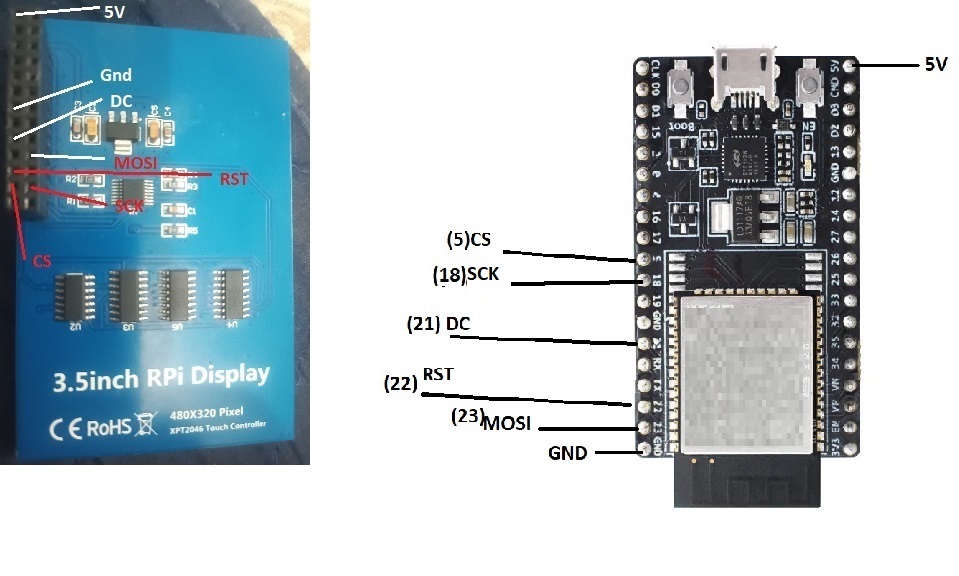
## Example Connection
The diagram below shows connections as in `sdkconfig.defaults` for the 3.5 inch RPI LCD.
---
## License
MIT License — see LICENSE file.
Supports all targets
To add this component to your project, run:
download archive
idf.py add-dependency "khiyamiftikhar/esp-lcd-ili9486^1.1.0"
Stats
-
Archive size ~ 51.00 KB
-
Downloaded in total 146 times
-
Weekly Downloads (All Versions)
-
This version: 99 times
Badge
