uploaded 8 hours ago
ESP-IDF driver for ILI9486 LCD controller
Readme
# esp-lcd-ili9486



ESP-IDF v5.5 / v6.x compatible **`esp_lcd` panel driver** for the **ILI9486 320×480 SPI TFT display**.
This component integrates with Espressif's `esp_lcd` abstraction layer and supports:
* Raw `esp_lcd` usage
* LVGL integration via `lvgl_port`
---
## Features
* Compatible with the `esp_lcd` panel API
* Native RGB565 pixel format — no conversion overhead
* Proper CASET/RASET coordinate window handling for SPI mode
* LVGL v9 compatible
* Configurable via Kconfig
* Includes working raw and LVGL examples
* Includes Unity hardware verification tests
---
## Chip Support
| Chip | Status |
|----------|--------|
| ESP32 | ✅ Tested |
| ESP32-S2 | ⚠️ Expected to work |
| ESP32-S3 | ⚠️ Expected to work |
| ESP32-C3 | ✅ Tested |
---
## Installation
### Using ESP-IDF Component Manager (Recommended)
```bash
idf.py add-dependency "khiyamiftikhar/esp-lcd-ili9486^2.0.0"
```
Or in your project's `idf_component.yml`:
```yaml
dependencies:
khiyamiftikhar/esp-lcd-ili9486: "^2.0.0"
```
Then configure via:
```
idf.py menuconfig
Component config → ILI9486 Panel Driver
```
### Upgrading from 1.x
Version 2.0.0 fixes the init sequence so the panel's settings are actually
applied. As a result, the image is no longer mirrored, so **remove**
`esp_lcd_panel_mirror(panel, true, false)` or LVGL `rotation.mirror_x = true`
if you added it as a workaround. See [CHANGELOG.md](CHANGELOG.md).
---
## Usage
After initializing the SPI bus and creating panel IO with:
```c
.lcd_cmd_bits = 8
.lcd_param_bits = 8
```
Create the panel via `esp_lcd_new_panel_ili9486()` and use the standard `esp_lcd` API:
* `esp_lcd_panel_draw_bitmap()`
* `esp_lcd_panel_mirror()`
* `esp_lcd_panel_swap_xy()`
* `esp_lcd_panel_disp_on_off()`
For complete initialization flows, see the examples below.
---
## Examples
### `examples/basic_init`
Raw `esp_lcd` usage without LVGL: initializes the panel and runs colour,
addressing and orientation test patterns.
### `examples/lvgl_demo`
LVGL integration via `esp_lvgl_port`, with a full colour verification
sequence (primary colours, rainbow, widgets and a colour-cycling progress bar).
### `examples/ipcam`
Streams a live JPEG from an IP camera URL over HTTP and renders it to the panel
in 480×320 landscape mode, row by row. No framebuffer. Demonstrates SPI panel
init, DMA-backed row writes, FreeRTOS async decode, and HTTP streaming with an
input prefetch buffer.
### `examples/https`
Fetches the classic [Lenna](https://i.gzn.jp/img/2009/06/18/lenna/000.jpg)
test image over HTTPS and displays it on the panel with automatic scale
selection and pan control. Demonstrates TLS, scale/pan,
and correct resource lifetime across async decode callbacks.
Each example is self-contained and ready to build for ESP32 or ESP32-C3 (see
[Building the Examples for Other Targets](#building-the-examples-for-other-targets)).
---
## Important Hardware Notes
### 1️⃣ 8-bit Command and Parameter Mode
Configure the panel IO with 8-bit commands and parameters:
```c
.lcd_cmd_bits = 8
.lcd_param_bits = 8
```
This panel expects each parameter as a 16-bit word (`0x00`, value), sent in a
separate transaction from its command. The driver does that padding itself, so
leave the IO config at 8 bits. Setting `lcd_param_bits = 16` makes ESP-IDF pad
parameters a second time, and the panel ignores them.
---
### 2️⃣ CASET / RASET Window Handling
The ILI9486 requires coordinate window parameters to be sent correctly over SPI. This driver handles that internally — no special treatment needed from the application side.
---
### 3️⃣ Native RGB565 over SPI
This driver operates in native RGB565 mode (`COLMOD = 0x55`). Pixel data is sent as 16-bit RGB565 directly with no conversion. Pass `bits_per_pixel = 16` in the panel config:
```c
esp_lcd_panel_dev_config_t panel_config = {
.reset_gpio_num = PIN_NUM_RST,
.bits_per_pixel = 16,
.rgb_ele_order = LCD_RGB_ELEMENT_ORDER_RGB,
};
```
The driver sets the panel's BGR bit itself, so `rgb_ele_order` does not change
the colours. The examples use `LCD_RGB_ELEMENT_ORDER_RGB`.
**Byte order:** the panel expects each pixel high byte first, but ESP32 chips
store `uint16_t` low byte first. Swap the bytes of every pixel you pass to
`esp_lcd_panel_draw_bitmap()`:
```c
#define RGB565(r, g, b) __builtin_bswap16((uint16_t)((((r) & 0xF8) << 8) | \
(((g) & 0xFC) << 3) | ((b) >> 3)))
```
With LVGL, set `.flags.swap_bytes = true` in `lvgl_port_display_cfg_t` instead.
Without the swap, red shows as blue, green as red and blue as green.
---
### 4️⃣ LVGL Orientation Handling
When using `lvgl_port`, do not manually call `esp_lcd_panel_mirror()` after initialization. Rotation must be controlled via `lvgl_port_display_cfg_t.rotation`.
The default orientation is correct as-is: use `mirror_x = false` and
`mirror_y = false` for portrait.
---
### 5️⃣ Async Transfer Callback
If `.on_color_trans_done` is enabled without proper synchronization, `draw_bitmap()` may block indefinitely. For raw usage without a transaction-done callback, set:
```c
.on_color_trans_done = NULL
```
---
## Configuration (Kconfig)
Available under:
```
Component config → ILI9486 Panel Driver
```
Configurable parameters include SPI host, GPIO pins, pixel clock, resolution, and backlight polarity.
---
## Building the Examples for Other Targets
Every example has three defaults files:
| File | Contents |
|------|----------|
| `sdkconfig.defaults` | Settings shared by all targets (resolution) |
| `sdkconfig.defaults.esp32` | ESP32 pins and SPI clock |
| `sdkconfig.defaults.esp32c3` | ESP32-C3 pins, SPI clock and USB console |
The simplest way is to set the target and build. ESP-IDF loads
`sdkconfig.defaults` plus the file for the current target automatically:
```
idf.py set-target esp32c3
idf.py build
```
To keep several targets side by side, use a separate build folder and
sdkconfig file per target:
**ESP32** (PowerShell)
```
$env:IDF_TARGET="esp32"
idf.py -B build_esp32 -D SDKCONFIG=sdkconfig.esp32 -D SDKCONFIG_DEFAULTS="sdkconfig.defaults;sdkconfig.defaults.esp32" -D IDF_TARGET=esp32 build
```
**ESP32-C3** (PowerShell)
```
$env:IDF_TARGET="esp32c3"
idf.py -B build_esp32c3 -D SDKCONFIG=sdkconfig.esp32c3 -D SDKCONFIG_DEFAULTS="sdkconfig.defaults;sdkconfig.defaults.esp32c3" -D IDF_TARGET=esp32c3 build
```
Setting `SDKCONFIG_DEFAULTS` replaces the default list, so always list
`sdkconfig.defaults` first, then the target file. After changing a defaults
file, delete the matching `sdkconfig.<target>` so it is regenerated.
---
## Running Tests
```bash
cd test_app
idf.py set-target esp32 # or esp32c3
idf.py build flash monitor
```
`test_app` uses the same per-target defaults files as the examples
(see [Building the Examples for Other Targets](#building-the-examples-for-other-targets)).
Unity tests verify pixel correctness, window addressing, orientation, and full-screen rendering.
---
## Known Limitations
* SPI clock above 10 MHz not fully validated
* ILI9488 not tested
* Some module variants may require init sequence adjustments
---
## Example Connection
The diagram below shows the ESP32 connections from `sdkconfig.defaults.esp32` for the 3.5 inch RPI LCD.
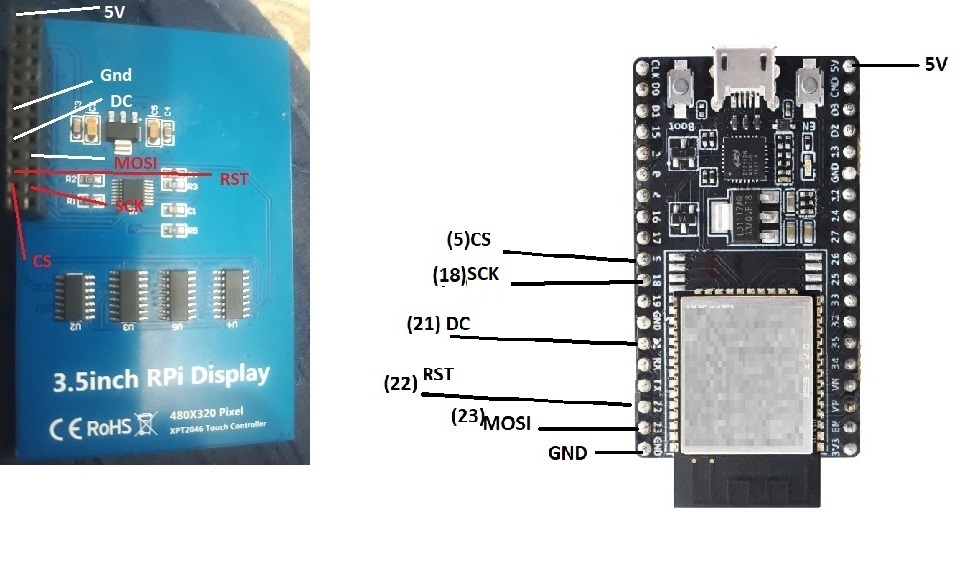
ESP32-C3 connections, from `sdkconfig.defaults.esp32c3`:
| Display | ESP32-C3 |
|---------|----------|
| MOSI / SDA | GPIO 7 |
| SCLK | GPIO 6 |
| CS | GPIO 10 |
| DC / RS | GPIO 5 |
| RST | GPIO 4 |
| BL / LED | GPIO 3 |
| VCC / GND | 3.3 V / GND |
On ESP32-C3, avoid GPIO 2, 8 and 9 (strapping), 11–17 (flash on most
modules), 18–19 (USB) and 20–21 (UART0).
---
## License
MIT License — see LICENSE file.
Supports all targets
To add this component to your project, run:
download archive
idf.py add-dependency "khiyamiftikhar/esp-lcd-ili9486^2.0.0"
Stats
-
Archive size ~ 61.58 KB
-
Downloaded in total 191 times
-
Weekly Downloads (All Versions)
-
This version: 0 times
Badge
