uploaded 3 weeks ago
Soldered Inputronic KEYBOARD (TCA8418 80-key I2C keypad) component
Readme
# Soldered Inputronic KEYBOARD ESP-IDF Component
| 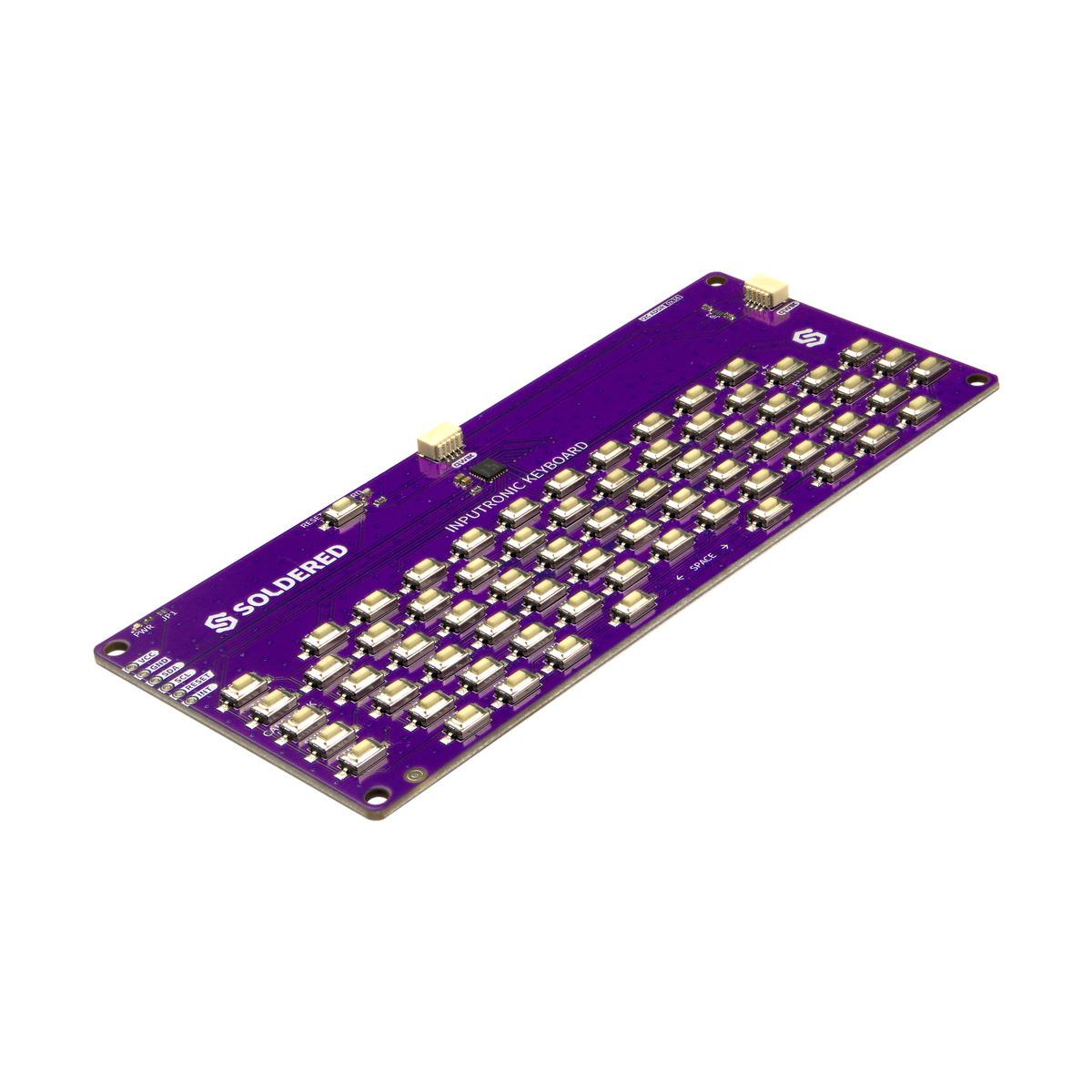 |
| :--------------------------------------------------------------------------------------------------------------------------------: |
| [Inputronic Keyboard - 80-Key I2C Keypad Breakout](https://solde.red/333360) |
Inputronic KEYBOARD is a complete 80-key keypad breakout (8x10 tactile-switch matrix) built around Texas Instruments' TCA8418 I2C keyboard scanner. Rather than consuming 18 GPIO pins on a microcontroller, the chip handles scanning and debouncing independently and reports key press/release events over I2C (address 0x34) via a 10-event FIFO buffer. Two Qwiic connectors provide solder-free wiring. Part of the [Qwiic ecosystem](https://soldered.com/collections/qwiic-ecosystem).
ESP-IDF component for the Inputronic KEYBOARD. It decodes every key press and release into a matrix position, a key label and the character it types, with SHIFT and caps lock handled, and has a blocking line input helper.
### Repository Contents
- **/src** - `soldered_inputronic_keyboard.c`, the driver and the default keymaps
- **/include** - `soldered_inputronic_keyboard.h`, the public API
- **/examples**
- `keyboard_poll` - logs row, column, label and character of every key press
- `serial_type` - echoes typing to the console like a terminal
- `string_input` - reads a line with `inputronic_keyboard_string_input()` and a timeout
- **_other_** - idf_component.yml manifest file for ESP Component Registry
### Usage
Add the component to your project's `main/idf_component.yml`:
```yaml
dependencies:
solderedelectronics/soldered-inputronic-keyboard-esp-idf-component: "*"
```
The I2C bus belongs to the application so that other devices can share it. Create it first, then hand it to the driver:
```c
#include "soldered_inputronic_keyboard.h"
i2c_master_bus_handle_t bus;
i2c_master_bus_config_t bus_cfg = {
.i2c_port = I2C_NUM_0,
.sda_io_num = GPIO_NUM_8,
.scl_io_num = GPIO_NUM_9,
.clk_source = I2C_CLK_SRC_DEFAULT,
.flags.enable_internal_pullup = true,
};
ESP_ERROR_CHECK(i2c_new_master_bus(&bus_cfg, &bus));
inputronic_keyboard_t kbd;
inputronic_keyboard_config_t config = INPUTRONIC_KEYBOARD_CONFIG_DEFAULT(bus);
ESP_ERROR_CHECK(inputronic_keyboard_init(&kbd, &config));
while (1) {
inputronic_keyboard_event_t event;
while (inputronic_keyboard_read_event(&kbd, &event) == ESP_OK) {
if (event.pressed && event.character) {
printf("%c", event.character);
}
}
vTaskDelay(pdMS_TO_TICKS(20));
}
```
The TCA8418 queues up to 10 events and drops anything past that, so read it often (every 20 ms is plenty) and drain it each time: `inputronic_keyboard_read_event()` returns `ESP_ERR_NOT_FOUND` once the FIFO is empty. The INT pin is not used.
A keyboard handle is not thread safe, use it from one task or guard it with a mutex.
### Keys, CAPS and SHIFT
Every key has a label from the keymap, indexed `[row][col]`:
| Row | Labels (col 0 to 9) |
| :-: | :------------------ |
| 0 | -, -, -, -, -, -, `UP`, `LEFT`, `DOWN`, `RIGHT` |
| 1 | -, -, -, `BACK`, `ENTER`, `DEL`, `FN3`, `FN4`, `FN5`, `FN6` |
| 2 | `F1` to `F10` |
| 3 | `0` to `9` |
| 4 | `P`, `Q`, `W`, `E`, `R`, `T`, `Y`, `U`, `I`, `O` |
| 5 | `;`, `A`, `S`, `D`, `F`, `G`, `H`, `J`, `K`, `L` |
| 6 | -, `Z`, `X`, `C`, `V`, `B`, `N`, `M`, `,`, `.` |
| 7 | -, `ESC`, `TAB`, `CAPS`, `SHIFT`, `CTRL`, `ALT`, `FN1`, `FN2`, `SPACE` |
Same behaviour as the Arduino library:
- The keyboard starts with caps lock on (uppercase letters). Pressing `CAPS` toggles it, switching between `INPUTRONIC_KEYBOARD_KEYMAP_UPPER` and `INPUTRONIC_KEYBOARD_KEYMAP_LOWER`. `inputronic_keyboard_set_caps_lock()` sets it directly.
- While `SHIFT` is held, letters invert their case and numbers and symbols go through the SHIFT table (`1` -> `!`, `2` -> `"`, ..., `7` -> `/`, `0` -> `=`, `;` -> `:`, `,` -> `;`, `.` -> `:`).
- `event.character` holds what a press types, `' '` for `SPACE`, and `0` for keys that type nothing (`ENTER`, `SHIFT`, `F1`, ...). Check `event.label` for those.
#### Custom layouts
Point the config at your own tables to change the layout or the SHIFT table. Any field left `NULL` keeps the default, and the tables must outlive the keyboard handle:
```c
// US style SHIFT symbols
static const inputronic_keyboard_shift_pair_t US_SHIFT[] = {
{'1', '!'}, {'2', '@'}, {'3', '#'}, {'4', '$'}, {'5', '%'},
{'6', '^'}, {'7', '&'}, {'8', '*'}, {'9', '('}, {'0', ')'},
{';', ':'}, {',', '<'}, {'.', '>'},
};
inputronic_keyboard_config_t config = INPUTRONIC_KEYBOARD_CONFIG_DEFAULT(bus);
config.shift_map = US_SHIFT;
config.shift_map_len = sizeof(US_SHIFT) / sizeof(US_SHIFT[0]);
```
Custom keymaps (`config.keymap_upper`, `config.keymap_lower`) are `inputronic_keyboard_keymap_t` tables. The driver finds `CAPS`, `SHIFT` and `SPACE` by label, so keep those labels on whichever keys should do that.
### API
| Function | Description |
| :------- | :---------- |
| `inputronic_keyboard_init()` / `_deinit()` | Add the keyboard to the bus and configure it / remove it. `ESP_ERR_NOT_FOUND` if nothing answers |
| `inputronic_keyboard_read_event()` | Read and decode the oldest event, `ESP_ERR_NOT_FOUND` when the FIFO is empty |
| `inputronic_keyboard_events_available()` | Number of events waiting, 0..10 |
| `inputronic_keyboard_clear_events()` | Throw away every waiting event |
| `inputronic_keyboard_string_input()` | Block until a line is typed and ENTER pressed, or a timeout runs out (`ESP_ERR_TIMEOUT`) |
| `inputronic_keyboard_is_key_pressed()` / `_is_label_pressed()` | Whether a key is held, by position or by label |
| `inputronic_keyboard_any_key_pressed()` / `_held_count()` | Whether any key is held / how many |
| `inputronic_keyboard_get_last_key()` | Position and label of the last pressed key |
| `inputronic_keyboard_get_label()` / `_find_key()` | Label at a position / position of a label, in the active keymap |
| `inputronic_keyboard_label_to_char()` | What a single character label types right now, SHIFT applied |
| `inputronic_keyboard_get_caps_lock()` / `_set_caps_lock()` | Read or set caps lock |
### Hardware design
You can find hardware design for this board in the [Inputronic KEYBOARD hardware design](https://github.com/SolderedElectronics/Inputronic-KEYBOARD-hardware-design) repository.
### Documentation
Access library documentation [here](https://docs.soldered.com/).
### About Soldered
<img src="https://raw.githubusercontent.com/SolderedElectronics/Soldered-Generic-Arduino-Library/dev/extras/Soldered-logo-color.png" alt="soldered-logo" width="500"/>
At Soldered, we design and manufacture a wide selection of electronic products to help you turn your ideas into acts and bring you one step closer to your final project. Our products are intented for makers and crafted in-house by our experienced team in Osijek, Croatia. We believe that sharing is a crucial element for improvement and innovation, and we work hard to stay connected with all our makers regardless of their skill or experience level. Therefore, all our products are open-source. Finally, we always have your back. If you face any problem concerning either your shopping experience or your electronics project, our team will help you deal with it, offering efficient customer service and cost-free technical support anytime. Some of those might be useful for you:
- [Web Store](https://www.soldered.com/shop)
- [Tutorials & Projects](https://soldered.com/learn)
- [Documentation](https://docs.soldered.com)
### Original source
This is a port of the [Soldered Inputronic KEYBOARD Arduino library](https://github.com/SolderedElectronics/SOLDERED-Inputronic-KEYBOARD-Arduino-Library). Register setup, event decoding, keymaps and SHIFT handling follow it. The Arduino `typeOn()` helper is not ported: poll `inputronic_keyboard_read_event()` and act on `event.label` / `event.character` instead, as the `serial_type` example does.
### Open-source license
Soldered invests vast amounts of time into hardware & software for these products, which are all open-source. Please support future development by buying one of our products.
Check license details in the LICENSE file. Long story short, use these open-source files for any purpose you want to, as long as you apply the same open-source licence to it and disclose the original source. No warranty - all designs in this repository are distributed in the hope that they will be useful, but without any warranty. They are provided "AS IS", therefore without warranty of any kind, either expressed or implied. The entire quality and performance of what you do with the contents of this repository are your responsibility. In no event, Soldered (TAVU) will be liable for your damages, losses, including any general, special, incidental or consequential damage arising out of the use or inability to use the contents of this repository.
## Have fun!
And thank you from your fellow makers at Soldered Electronics.
Links
- Homepage
-
Repository
1ae29a1eaa1f48652e1dbc57f27b300339042d75
- GPL-3.0-only
Supports all targets
To add this component to your project, run:
download archive
idf.py add-dependency "solderedelectronics/soldered-inputronic-keyboard-esp-idf-component^1.0.0"
Stats
-
Archive size ~ 31.17 KB
-
Downloaded in total 1 time
-
Weekly Downloads (All Versions)
-
This version: 1 time
Badge
