uploaded 1 month ago
Board Support Package (BSP) for VIEWE UEDX80480043E-WB (4.3-inch RGB + GT911)
Readme
# BSP: VIEWE UEDX80480043E-WB
[English](README.md) | [中文](README_CN.md)
| [HW Reference](https://github.com/VIEWESMART/UEDX80480043ESP32-4.3inch-Touch-Display) | [HOW TO USE API](API.md) | [CONFIGURATION](#configuration) | [EXAMPLES](#compatible-bsp-examples) | [](https://components.espressif.com/components/viewesmart/bsp_uedx80480043_wb_a) |  |
| --- | --- | --- | --- | --- | --- |
## Overview
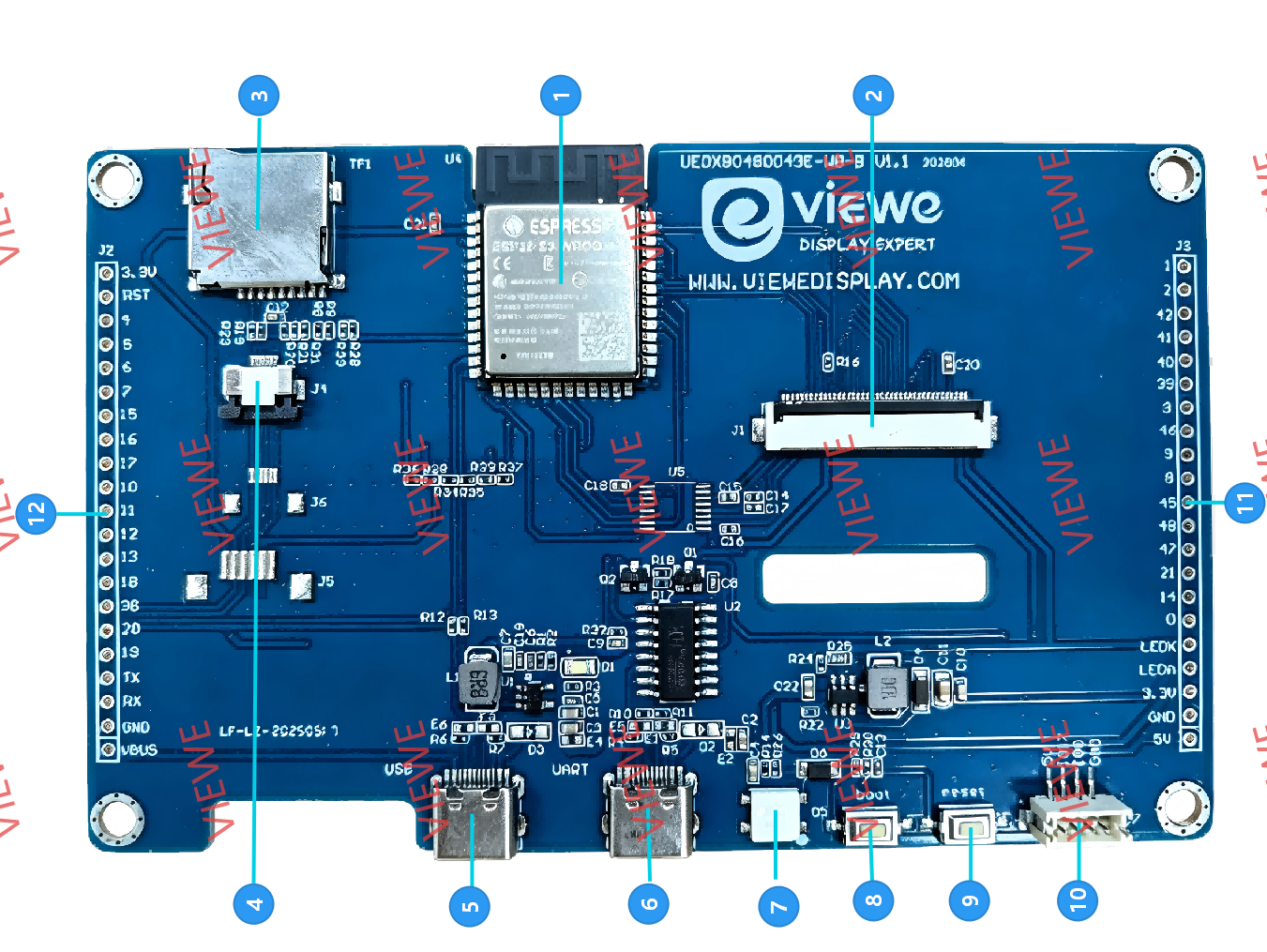
UEDX80480043E-WB is a 4.3-inch ESP32-S3 smart display from [VIEWE](https://viewedisplay.com/). This Board Support Package (BSP) follows the Espressif BSP API so you can bring up LCD, touch, SD, Wi-Fi and BLE without writing board-level glue.
The PCB silkscreen is **UEDX80480043_WB_A** (WB-A / WB-B are software compatible). The same PCB can be fitted with a 480×272 module sold as **UEDX48270043**. The component name is `bsp_uedx80480043_wb_a`; only the LCD panel option changes.
**Board features:**
* ESP32-S3-WROOM-1 **N16R8** (16 MB Flash + 8 MB OPI PSRAM)
* 4.3" RGB LCD, RGB565
* **UEDX80480043**: 800×480 (default)
* **UEDX48270043**: 480×272 (compatible module on the same PCB)
* Capacitive touch: GT911 (I2C)
* MicroSD (SPI)
* Wi-Fi 2.4 GHz + Bluetooth 5 LE (shared RF front-end)
* BOOT button (GPIO0)
* USB Type-C for power, download and serial
> [!NOTE]
> WB-A and WB-B have no software difference. New designs should use WB-B.
## LCD panels
The same PCB accepts two 4.3" modules. Switch them in [Configuration](#change-the-lcd-panel-800x480--480x272); resolution, RGB timing, PCLK and bounce-buffer height follow automatically.
| Panel | Resolution | PCLK | HSYNC (pw / bp / fp) | VSYNC (pw / bp / fp) | Bounce height |
| --- | --- | --- | --- | --- | --- |
| UEDX80480043 (default) | 800×480 | 16 MHz | 4 / 40 / 20 | 4 / 16 / 16 | 24 |
| UEDX48270043 | 480×272 | 12 MHz | 4 / 43 / 8 | 4 / 12 / 8 | 17 |
Both panels use `pclk_active_neg`. RGB bounce buffers run from internal SRAM while the frame buffer stays in PSRAM. Do not set bounce height by hand: it must divide `V_RES`.
LVGL is registered through [`espressif/esp_lvgl_adapter`](https://components.espressif.com/components/espressif/esp_lvgl_adapter). Defaults used on this board:
* Tear avoidance: `ESP_LV_ADAPTER_TEAR_AVOID_MODE_TRIPLE_FULL`
* LVGL task stack: 32 KB, pinned to core 0
## Capabilities and dependencies
| Available | Capability | Controller/Codec | Component | Version |
| --- | --- | --- | --- | --- |
| :heavy_check_mark: | :pager: DISPLAY | ST7262 / RGB | idf | >=5.5 |
| :heavy_check_mark: | :black_circle: LVGL | | [espressif/esp_lvgl_adapter](https://components.espressif.com/components/espressif/esp_lvgl_adapter) [lvgl/lvgl](https://components.espressif.com/components/lvgl/lvgl) | ^0.6 ^9 |
| :heavy_check_mark: | :point_up: TOUCH | GT911 | [espressif/esp_lcd_touch_gt911](https://components.espressif.com/components/espressif/esp_lcd_touch_gt911) | ^1 |
| :heavy_check_mark: | :radio_button: BUTTONS | | [espressif/button](https://components.espressif.com/components/espressif/button) | ^4 |
| :x: | :white_circle: KNOB | | | |
| :x: | :musical_note: AUDIO | | | |
| :heavy_check_mark: | :floppy_disk: SDCARD | SPI | idf | >=5.5 |
| :heavy_check_mark: | :bulb: LED | WS2812B (GPIO17) | | |
| :x: | :camera: CAMERA | | | |
| :x: | :video_game: IMU | | | |
## Pinout
| Function | GPIO |
| --- | --- |
| LCD PCLK / DE / HSYNC / VSYNC | 42 / 40 / 39 / 41 |
| LCD DATA0–15 (RGB565) | 8, 3, 46, 9, 1, 5, 6, 7, 15, 16, 4, 45, 48, 47, 21, 14 |
| Backlight | 2 (LEDC PWM, active high) |
| Touch SDA / SCL / RST | 19 / 20 / 38 (INT unused) |
| SD MOSI / MISO / SCLK / CS | 11 / 13 / 12 / 10 |
| UART0 TX / RX | 43 / 44 |
| BOOT | 0 |
| Free IO / WS2812B | 17 |
I2C for GT911 defaults to **100 kHz**.
## Hardware reference
* [UEDX80480043 (800×480) GitHub](https://github.com/VIEWESMART/UEDX80480043ESP32-4.3inch-Touch-Display)
* [UEDX48270043 (480×272) GitHub](https://github.com/VIEWESMART/UEDX48270043E-ESP32-4.3inch-Touch-Display)
## Usage
Requires **ESP-IDF >= 5.5**.
```bash
idf.py add-dependency "viewesmart/bsp_uedx80480043_wb_a^1.0.0"
```
Or in your project's `idf_component.yml`:
```yaml
dependencies:
viewesmart/bsp_uedx80480043_wb_a: "^1.0.0"
```
Minimal example:
```c
#include "bsp/esp-bsp.h"
void app_main(void)
{
lv_display_t *disp = bsp_display_start();
assert(disp);
if (bsp_display_lock(-1)) {
lv_obj_t *label = lv_label_create(lv_screen_active());
lv_label_set_text(label, "UEDX80480043");
lv_obj_center(label);
bsp_display_unlock();
}
}
```
Call LVGL APIs only between `bsp_display_lock()` and `bsp_display_unlock()`. See [API.md](API.md) for display, touch, SD, Wi-Fi, BLE and buttons. How to switch the LCD panel, set Wi-Fi SSID/password, I2C speed and other options is in [Configuration](#configuration).
> [!IMPORTANT]
> ESP32-S3 Wi-Fi and BLE share one RF front-end and cannot transmit or receive at the same time.
## Configuration
BSP options are under **Component config → Board Support Package** in menuconfig:
```bash
idf.py menuconfig
```
You can also write the same `CONFIG_*` symbols into the project's `sdkconfig.defaults`.
> [!IMPORTANT]
> If `sdkconfig` already exists, editing `sdkconfig.defaults` does **not** take effect. Delete `sdkconfig` (and usually `sdkconfig.old`) then run `idf.py reconfigure` or `idf.py build`.
### Change the LCD panel (800×480 / 480×272)
**menuconfig:** Component config → Board Support Package → Display → **4.3" LCD panel**
- `UEDX80480043 800x480` (default)
- `UEDX48270043 480x272`
Or in `sdkconfig.defaults`:
```
# 800x480 (default)
CONFIG_BSP_LCD_PANEL_800X480=y
# 480x272 — uncomment this and remove the line above
# CONFIG_BSP_LCD_PANEL_480X272=y
```
After the choice, these follow automatically (do not edit bounce height):
| Choice | `BSP_LCD_H_RES` × `V_RES` | PCLK | Bounce |
| --- | --- | --- | --- |
| `CONFIG_BSP_LCD_PANEL_800X480` | 800×480 | 16 MHz | 24 |
| `CONFIG_BSP_LCD_PANEL_480X272` | 480×272 | 12 MHz | 17 |
Application code should use `BSP_LCD_H_RES` / `BSP_LCD_V_RES`, not hardcoded sizes.
### Wi-Fi SSID and password
**menuconfig:** Component config → Board Support Package → Wi-Fi → **Default STA SSID** / **Default STA password**
Or in `sdkconfig.defaults`:
```
CONFIG_BSP_WIFI_SSID="your_ssid"
CONFIG_BSP_WIFI_PASSWORD="your_password"
```
Then in application code:
```c
#include "bsp/esp-bsp.h"
void app_main(void)
{
ESP_ERROR_CHECK(bsp_wifi_connect(CONFIG_BSP_WIFI_SSID, CONFIG_BSP_WIFI_PASSWORD));
}
```
Leave both empty if the app passes credentials as C strings. Only **2.4 GHz** APs are supported.
The `02_wifi` example uses **Example Configuration** (`CONFIG_EXAMPLE_WIFI_SSID` / `CONFIG_EXAMPLE_WIFI_PASSWORD`) so SSID/password sit next to that example. That is independent of `CONFIG_BSP_WIFI_*`.
### Other BSP options
Paths in the table are under **Component config → Board Support Package**.
| menuconfig | `CONFIG_*` | Default | Notes |
| --- | --- | --- | --- |
| Display → 4.3" LCD panel | `BSP_LCD_PANEL_800X480` / `BSP_LCD_PANEL_480X272` | 800×480 | See above |
| Display → Backlight LEDC channel | `BSP_DISPLAY_BRIGHTNESS_LEDC_CH` | 1 | PWM channel for GPIO2 |
| I2C → I2C peripheral index | `BSP_I2C_NUM` | 0 | GT911 bus |
| I2C → I2C clock speed (Hz) | `BSP_I2C_CLK_SPEED_HZ` | 100000 | 100 kHz recommended |
| SD card → mount point | `BSP_SD_MOUNT_POINT` | `/sdcard` | Used by `bsp_sdcard_mount()` |
| SD card → Format if mount fails | `BSP_SD_FORMAT_ON_MOUNT_FAIL` | n | Destroys card data |
| SPIFFS → mount point | `BSP_SPIFFS_MOUNT_POINT` | `/spiffs` | Needs a `storage` partition |
| SPIFFS → partition label | `BSP_SPIFFS_PARTITION_LABEL` | `storage` | |
| Wi-Fi → Default STA SSID | `BSP_WIFI_SSID` | empty | See above |
| Wi-Fi → Default STA password | `BSP_WIFI_PASSWORD` | empty | See above |
| Enable error check in BSP | `BSP_ERROR_CHECK` | y | Abort on BSP API errors |
### RGB + PSRAM (recommended)
These are **project** sdkconfig options, not BSP Kconfig. The examples already set them:
```
CONFIG_SPIRAM=y
CONFIG_SPIRAM_MODE_OCT=y
CONFIG_SPIRAM_XIP_FROM_PSRAM=y
CONFIG_ESP32S3_DATA_CACHE_LINE_64B=y
CONFIG_ESPTOOLPY_FLASHSIZE_16MB=y
CONFIG_ESP_DEFAULT_CPU_FREQ_MHZ_240=y
```
Without OPI PSRAM + 64-byte cache line, the RGB panel may drift.
## Compatible BSP Examples
Examples for this component are available at [GitHub](https://github.com/VIEWESMART/UEDX80480043ESP32-4.3inch-Touch-Display/tree/main/examples/esp_idf):
| Example | Description |
| --- | --- |
| `01_i2c_scan` | Scan I2C and confirm GT911 (0x5D / 0x14) |
| `02_wifi` | Wi-Fi STA (SSID/password in that example) |
| `03_ble` | BLE GATT server with Just Works pairing |
| `04_sd` | SPI SD mount, list, read/write |
| `05_display_lvgl_port` | RGB + GT911 + `esp_lvgl_adapter`, LVGL widgets |
| `06_album` | Photo album from SD (`jpg` / `png` / `bmp`) |
```bat
cd examples/05_display_lvgl_port
idf.py set-target esp32s3
idf.py build flash monitor
```
For a 480×272 module, set **4.3" LCD panel** as described in [Configuration](#change-the-lcd-panel-800x480--480x272).
Target
To add this component to your project, run:
download archive
idf.py add-dependency "viewesmart/bsp_uedx80480043_wb_a^1.0.0"
Stats
-
Archive size ~ 28.30 KB
-
Downloaded in total 48 times
-
Weekly Downloads (All Versions)
-
This version: 48 times
Badge
