uploaded 2 months ago
Soldered Inputronic BRIDGE component
Readme
# Soldered Inputronic BRIDGE Component
| 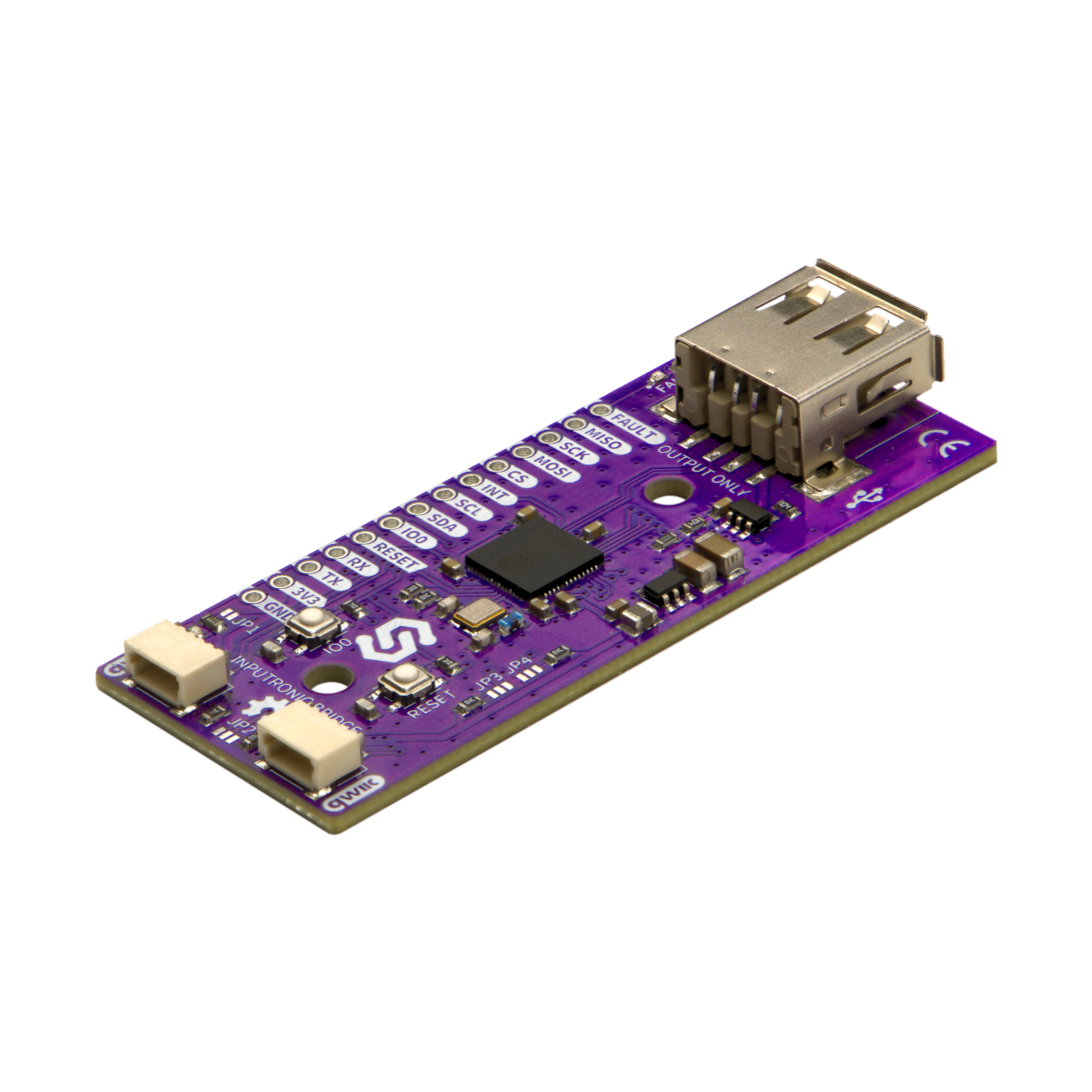 |
| :--------------------------------------------------------------------------------------------------: |
| [Inputronic BRIDGE](https://solde.red/333390) |
ESP-IDF driver for the Soldered Inputronic BRIDGE, which hosts a USB keyboard, mouse or MIDI controller and hands what they send to an MCU over UART, I2C or SPI. The BRIDGE does the USB hosting and the HID decoding, so a plain microcontroller with no USB host peripheral of its own can read keypresses, mouse movement and MIDI notes over three wires. Part of the [easyC ecosystem](https://www.soldered.com/en/easyC).
### Repository Contents
- **/src** - source files (.c)
- `soldered_inputronic_bridge.c` - the driver and the three transports
- `inputronic_bridge_parser.c` - the frame assembler and message parser
- **/include** - header files (.h)
- `soldered_inputronic_bridge.h` - the public API
- `inputronic_bridge_dfs.h` - wire protocol definitions and event structures
- `inputronic_bridge_parser.h` - parser state, used through the API above
- **/examples** - examples for using the library
- `polling_events` - read keyboard, mouse and MIDI events
- `interrupt_events` - sleep until the BRIDGE signals, then read it
- `event_queue` - queue every event so a burst of typing is not reduced to the last key
- `raw_hid` - read the USB descriptor and untouched HID reports
- `change_i2c_address` - move the BRIDGE to another I2C address for good
Every example is wired for I2C and carries commented out UART and SPI blocks next to the I2C one, so switching bus means commenting one block out and the next one in. Each block holds nothing but code, so uncommenting a whole block never leaves prose behind to be compiled.
- **_other_** - idf_component.yml manifest file for ESP Component Registry
### Usage
Pick the transport the BRIDGE is wired for and initialize the matching handle. Over I2C, the bus belongs to your application so that other devices can share it:
```c
i2c_master_bus_handle_t bus;
i2c_master_bus_config_t bus_cfg = {
.i2c_port = I2C_NUM_0,
.sda_io_num = GPIO_NUM_21,
.scl_io_num = GPIO_NUM_22,
.clk_source = I2C_CLK_SRC_DEFAULT,
.flags.enable_internal_pullup = true,
};
ESP_ERROR_CHECK(i2c_new_master_bus(&bus_cfg, &bus));
inputronic_bridge_t bridge;
inputronic_bridge_i2c_config_t config = INPUTRONIC_BRIDGE_I2C_CONFIG_DEFAULT(bus);
ESP_ERROR_CHECK(inputronic_bridge_init_i2c(&bridge, &config));
ESP_ERROR_CHECK(inputronic_bridge_begin(&bridge));
while (1) {
inputronic_bridge_events_t events;
ESP_ERROR_CHECK(inputronic_bridge_poll(&bridge, &events));
if (events.keyboard.valid) {
printf("keys: %s\n", events.keyboard.payload);
}
vTaskDelay(pdMS_TO_TICKS(20));
}
```
`inputronic_bridge_begin()` sends a `PING` and waits for the `PONG` the BRIDGE answers with, so a failure there means the wiring, the address or the baud rate is wrong. It succeeds with nothing plugged into the BRIDGE - a USB device is only needed for events to start arriving.
**Transports:** the same API sits on all three. `inputronic_bridge_init_uart()` needs two pins and nothing else, and is the one transport where the BRIDGE volunteers events without being asked. `inputronic_bridge_init_i2c()` takes a bus from `i2c_new_master_bus()` and answers on `INPUTRONIC_BRIDGE_DEFAULT_ADDRESS` (0x50) until moved. `inputronic_bridge_init_spi()` takes a host from `spi_bus_initialize()` and a chip select pin, and the driver drives the chip select itself. Over I2C and SPI it is the poll that fetches the next message, so nothing arrives unless something keeps polling.
**Reading events:** `inputronic_bridge_poll()` fills an `inputronic_bridge_events_t` with the newest event of each kind, each reported exactly once, so a `valid` flag that is false means nothing new of that kind. Keyboard messages carry the whole set of keys held down rather than keypresses - holding three keys gives one event listing all three, with printable keys as themselves and everything else as a name in angle brackets such as `<LeftCtrl>`. Mouse movement and scroll are relative to the last report and the buttons are absolute.
**Not dropping input:** with only the snapshot, whatever arrived between two polls is replaced by the newest of its kind, which suits a mouse and loses keystrokes when someone types fast. Setting `options.event_queue_depth` at init turns on a queue that holds every event in the order it happened, drained with `inputronic_bridge_receive()`:
```c
config.options.event_queue_depth = 16;
...
inputronic_bridge_event_t event;
while (inputronic_bridge_receive(&bridge, &event, 1000) == ESP_OK) {
if (event.type == INPUTRONIC_BRIDGE_EVENT_KEYBOARD) {
printf("keys: %s\n", event.keyboard.payload);
}
}
```
The queue is filled by `inputronic_bridge_poll()`, so something still has to poll; the point is that the side reading events can take as long as it likes.
**Interrupt pin:** the BRIDGE pulses its interrupt output low for 20 µs whenever it has a message waiting. Set `options.interrupt_pin` at init and `inputronic_bridge_wait_for_data()` blocks until that happens, which keeps the task off the CPU and the bus quiet instead of polling into the void:
```c
config.options.interrupt_pin = GPIO_NUM_5;
...
if (inputronic_bridge_wait_for_data(&bridge, 1000) == ESP_OK) {
inputronic_bridge_poll(&bridge, &events);
}
```
Pulses that arrive while your task is busy elsewhere are remembered, so one is never missed between two calls. Leave `interrupt_active_high` false unless the signal is inverted on the way in.
**Unrecognized devices:** the BRIDGE turns a keyboard or a mouse into ready made events, and anything else - a gamepad, a graphics tablet, a foot pedal - has to be read as raw HID reports and decoded by the application. `inputronic_bridge_request_descriptor()` asks what is attached and `inputronic_bridge_request_hid_raw()` asks for one untouched report, holding keyboard and mouse events back until it arrives so they cannot get in the way; `inputronic_bridge_set_hid_raw_polling()` keeps reports coming alongside ordinary events instead. Both descriptor and raw HID payloads are handed over as the hex string the BRIDGE sent and as the bytes it decodes to.
**When the BRIDGE is not connected:** a board that is unplugged, unpowered or at another address simply does not answer, and that is a state to sit out rather than a failure to bring the application down with. `inputronic_bridge_begin()` reports it as `ESP_ERR_NOT_FOUND` - over I2C in about a millisecond, since the address is probed before any PING - and `inputronic_bridge_poll()` returns the same while it lasts. Both leave the handle open and working, so polling picks the BRIDGE up by itself the moment it starts answering, with no re-initialization needed. Nothing in the driver aborts, which is why none of this belongs in `ESP_ERROR_CHECK()`:
```c
if (inputronic_bridge_begin(&bridge) != ESP_OK) {
ESP_LOGW(TAG, "No BRIDGE answered yet, carrying on and waiting for one");
}
while (1) {
if (inputronic_bridge_poll(&bridge, &events) != ESP_OK) {
vTaskDelay(pdMS_TO_TICKS(500)); // not answering, try again shortly
continue;
}
...
}
```
The driver says so once and then at most every couple of seconds rather than on every failed poll, and says so again when the BRIDGE comes back, so an unplugged board does not bury the log. `inputronic_bridge_is_connected()` reports where things stand. Over UART and SPI a BRIDGE that is not there is indistinguishable from one with nothing plugged into it, so there it simply looks like silence.
**Several BRIDGEs on one bus:** `inputronic_bridge_set_i2c_address()` stores a new address in the BRIDGE's own non-volatile memory, which takes effect immediately and survives a power cycle, and moves the handle over as well so it keeps working. Any address between 0x08 and 0x77 is allowed.
### Original source
This is a port of the [Soldered Inputronic BRIDGE Arduino library](https://github.com/SolderedElectronics/Soldered-Inputronic-BRIDGE-Library).
### Hardware design
You can find hardware design for this board in _Inputronic BRIDGE_ hardware repository.
### Documentation
Access library documentation [here](https://docs.soldered.com/).
### About Soldered
<img src="https://raw.githubusercontent.com/SolderedElectronics/Soldered-Generic-Arduino-Library/dev/extras/Soldered-logo-color.png" alt="soldered-logo" width="500"/>
At Soldered, we design and manufacture a wide selection of electronic products to help you turn your ideas into acts and bring you one step closer to your final project. Our products are intented for makers and crafted in-house by our experienced team in Osijek, Croatia. We believe that sharing is a crucial element for improvement and innovation, and we work hard to stay connected with all our makers regardless of their skill or experience level. Therefore, all our products are open-source. Finally, we always have your back. If you face any problem concerning either your shopping experience or your electronics project, our team will help you deal with it, offering efficient customer service and cost-free technical support anytime. Some of those might be useful for you:
- [Web Store](https://www.soldered.com/shop)
- [Tutorials & Projects](https://soldered.com/learn)
- [Documentation](https://docs.soldered.com)
### Open-source license
Soldered invests vast amounts of time into hardware & software for these products, which are all open-source. Please support future development by buying one of our products.
Check license details in the LICENSE file. Long story short, use these open-source files for any purpose you want to, as long as you apply the same open-source licence to it and disclose the original source. No warranty - all designs in this repository are distributed in the hope that they will be useful, but without any warranty. They are provided "AS IS", therefore without warranty of any kind, either expressed or implied. The entire quality and performance of what you do with the contents of this repository are your responsibility. In no event, Soldered (TAVU) will be liable for your damages, losses, including any general, special, incidental or consequential damage arising out of the use or inability to use the contents of this repository.
## Have fun!
And thank you from your fellow makers at Soldered Electronics.
Links
- Homepage
-
Repository
d46d1a94a48a626c6ffd672d213e449e71245547
- GPL-3.0-only
Supports all targets
To add this component to your project, run:
download archive
idf.py add-dependency "solderedelectronics/soldered-inputronic-bridge-esp-idf-component^1.0.0"
Stats
-
Archive size ~ 53.79 KB
-
Downloaded in total 12 times
-
Weekly Downloads (All Versions)
-
This version: 12 times
Badge
